
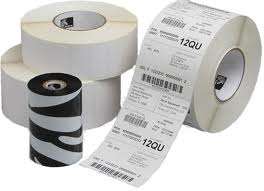
With so many different label printers and print media products available on the market it can be something of a minefield buying the correct compatible products. Here’s our concise guide to buying the right type of consumables for your direct thermal or thermal transfer label printer.
Label Roll Size
Most label rolls are supplied on either a 4″ (100 mm), 5″ (125 mm) or 8″ (200 mm) outside diameter roll.
Modern desktop label printers such as the Zebra GC, GK & GX series, Honeywell PC42 & PC43 range and Tec B-EV4, to name but a few, all have the capacity to take upto 5″ outside diameter label rolls. The less common 4″ diameter rolls (originally designed for older smaller printers) are also compatible with these models.
Industrial label printers such as the Zebra ZT200 & ZT400 range, Intermec PM4 series and Tec B series all have the capacity to take upto 8″ rolls but please note that you shouldn’t assume smaller rolls will fit into larger printers as invariably the smaller label rolls designed for desktop devices will have a smaller diameter core size that won’t fit these printers making them unusable.
Ink Ribbons For Label Printers
Ink ribbons come in two general core sizes (0.5″ for desktop printers and 1″ for larger industrial printers) and they have the ink coated on either the inside or outside of the roll to suit each type of manufacturer. The likes of Datamax require ink on the inside of the roll whereas Zebra, Sato & Honeywell all require outside ink rolls.
Ribbon lengths are relative to the physical size of the printer with the smaller desktop varietes taking a ribbon length of up to a maximum of 74 metres in the case of all modern Zebra printers and 91 metres for several other manufacturers units. Larger industrial printers can accommodate the 300, 360, 450 and in some cases 600 metre length ribbons which are designed to save time by virtue of the fact they don’t require changing quite as often.
Ribbon Grades
Getting the right label material and ink ribbon combination can be a work of art however there are some general guidelines you can follow to ensure you get an acceptable print quality from your label printer.
Wax ink ribbons generally work only on paper based label materials. The higher the gloss finish of the paper the more unlikely a wax ribbon will work and you should consider a higher grade ink for anything other than matt paper.
A Wax Resin ribbon is a higher grade ink which will give a more permanent print onto paper particularly higher grade or coated types and it will also work quite effectively on some types of synthetic materials too.
Resin ink ribbons are designed to work on synthetic materials such as Polyethylene, Polypropylene, Vinyl etc and these can also come in several grades to work on a variety of different materials such as fabric etc.
But please remember there’s one simple rule to getting it all right: If in doubt – always test the materials on your printer first. Barcodes For Business Ltd can help with this and we offer a range of free label & ribbon samples for you to trial. Please contact us for details.
Need more help?
Download our comprehensive Zebra Supplies media guide or go to our labels and ink ribbons page.
Need help selecting the right label printing system for your business? We have a useful guide here.
